How Flexweg CMS works
This page walks through what actually happens when you use the CMS — when you click Publish, when a visitor opens a page, when you switch themes — so the model makes sense before you start using it.
The three storage locations
Every piece of data Flexweg CMS manages lives in one of three places:
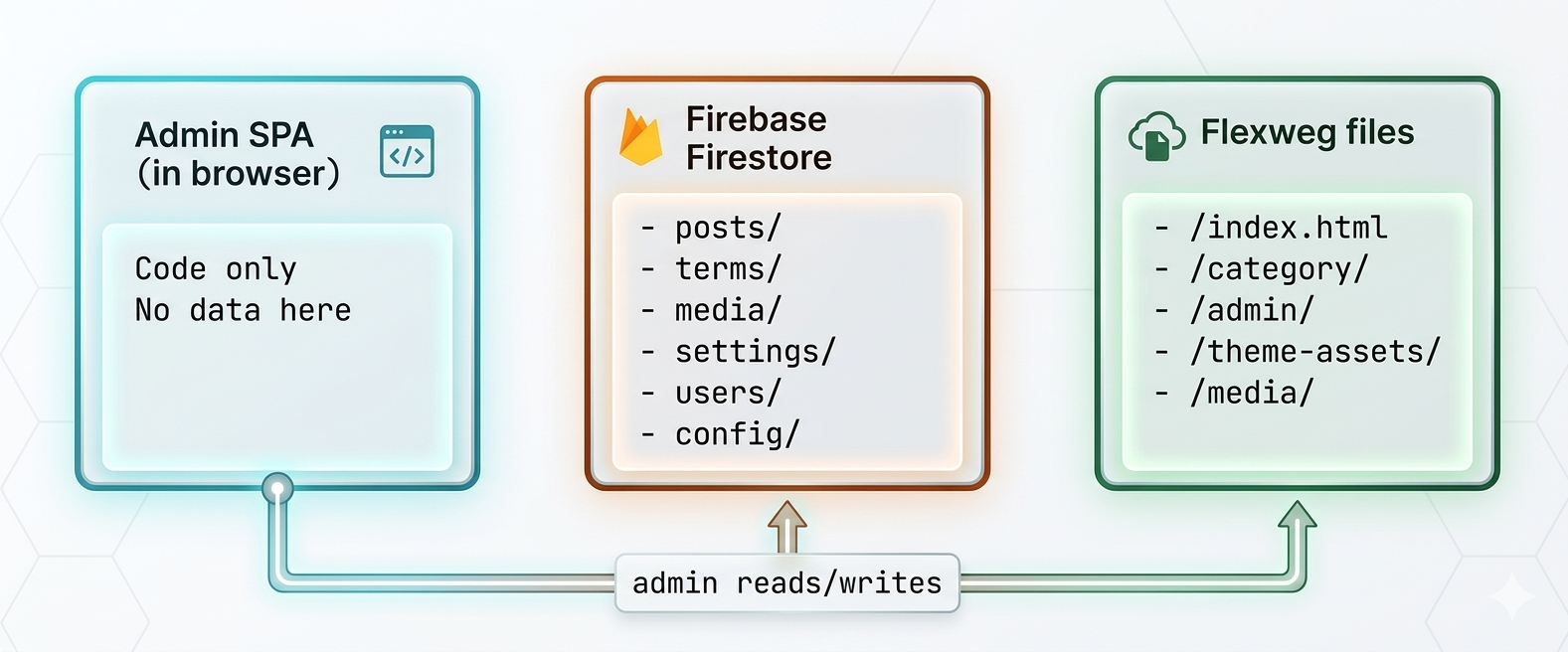
- Firebase Firestore — the source of truth for everything you edit: posts (drafts and online), pages, categories, tags, media metadata, settings, user profiles, plugin configurations. The admin SPA opens live subscriptions on these collections so changes propagate instantly across admin sessions.
- Flexweg files — the published artefacts: HTML pages your visitors load, theme CSS, media variants (resized images), generated files (sitemap.xml, rss.xml, etc.). Updated only when the admin explicitly publishes.
- Admin SPA — has no persistent state of its own. Everything it shows comes from Firestore subscriptions or
fetch()calls to the public site.
The publish flow
When you click Publish on a post:
- The admin reads the post + its dependencies (author, terms, hero media, settings) from Firestore.
- It runs the active theme's React components through
react-dom/server.renderToStaticMarkupin your browser — there's no server doing this work. - The result is an HTML string. The admin uploads it to Flexweg via
POST /api/v1/files/uploadat the post's target path (e.g.news/my-post.html). - The admin runs cascade regenerations: the home page (because the latest-posts list changed), every category archive that references the post, plus any plugin-driven outputs (sitemap entries, RSS feed, search index).
- Hooks fire: plugins listening on
publish.completeget a chance to react. - The post's
statusflips toonlinein Firestore, andlastPublishedPathrecords where it was published — used to clean up stale files if the slug or category changes later.
The whole flow runs in your browser. The admin orchestrates by making API calls to Firestore (read content) and Flexweg (write files).
URL structure
The CMS picks the URL for each post based on its slug and primary category:
| Content type | URL pattern |
|---|---|
| Post with category | /<category-slug>/<post-slug>.html |
| Post without category | /<post-slug>.html |
| Page (top-level) | /<page-slug>.html |
| Category archive | /<category-slug>/index.html |
| Home | /index.html |
| 404 fallback | /404.html |
Tags never appear in URLs — they're for filtering / UX only. All slugs are lower-case ASCII, dash-separated. The admin enforces this on every save.
When you change a post's slug or category, the admin deletes the old file before uploading the new one — your URLs stay tidy with no lingering 404s. See Stale path cleanup.
Themes are React components
A theme is a folder of React components — BaseLayout, HomeTemplate, SingleTemplate, CategoryTemplate, AuthorTemplate, NotFoundTemplate — plus a CSS file. The admin imports these and renders them with the post's data:
// Conceptually:
ReactDOMServer.renderToStaticMarkup(
  <BaseLayout site={site} pageTitle={post.title}>
    <SingleTemplate post={post} bodyHtml={renderedMarkdown} author={author} hero={heroImage} />
  </BaseLayout>
)
The <base> template wraps every page (head tags, header, footer, body classes); the inner template handles the page-specific content.
There's no server-side rendering. There's no client-side hydration. The output is plain static HTML. Theme components are essentially pure functions of (props) → HTML string.
That means your CSS is the only thing styling published pages — there's no <script> tag rehydrating React on the visitor's side. Some themes ship a small companion JS file (e.g. for menu hamburgers, related-posts widgets) but it's vanilla JS, not a React bundle.
Plugins extend by hooking the publish flow
Plugins register filters (transform a value as it passes through) and actions (side effects on lifecycle events) into a registry inspired by WordPress's hook system:
api.addFilter("page.head.extra", (head, baseProps) => {
  // Add a meta tag to every published page's <head>
  return head + '<meta name="generator" content="Flexweg CMS" />';
});

api.addAction("publish.complete", (post, ctx) => {
  // Run something after every successful publish
  console.log(`Published: ${post.title}`);
});
Some hooks transform the rendered HTML (page.head.extra, page.body.end, post.html.body); some fire on lifecycle events (publish.complete, post.unpublished, post.deleted); some let you mutate menu data (menu.json.resolved). See Hooks reference for the full list.
Plugins can also contribute:
- Editor blocks that show up in the post / page editor's inserter
- Dashboard cards that appear on the home dashboard
- Settings pages at
/settings/plugin/<plugin-id> - Translations in their own i18next namespace
Dynamic menus
Header / footer menus aren't baked into every page's HTML. Instead, the admin uploads a single small /menu.json file when you save the menu config, and every published page includes a <script> that fetches that JSON at load time and fills in [data-cms-menu="header"] / [data-cms-menu="footer"] containers.
That means changing a menu item never requires re-publishing every page — the change is live the next time anyone opens any page on your site. Same for the footer.
See Menus.
What stays in Firestore vs Flexweg
| Data | Lives in | Why |
|---|---|---|
| Post drafts | Firestore | Editable, frequently changed |
| Post markdown body | Firestore | Source of truth for re-rendering |
| Published HTML | Flexweg | Fast static serving |
| Settings | Firestore | Editable from admin |
| Plugin configs | Firestore | Editable from admin |
| External plugin/theme registry | Firestore | Survives admin redeploys |
| Site language, baseUrl | Firestore | Editable from admin |
| Theme + plugin code | Bundled in admin SPA | Static at deploy time |
| Theme CSS (compiled) | Flexweg /theme-assets/ | Referenced by every published page |
| Image variants (small/medium/large) | Flexweg /media/ | Served as-is to browsers |
| Image originals | Discarded | Only variants are kept |
| Search index | Flexweg /search-index.json | Loaded by the search modal |
| Sitemaps + RSS | Flexweg | Served to crawlers and feed readers |
| Menu structure | Flexweg /menu.json | Fetched by every published page at load time |
| User auth credentials | Firebase Auth | Standard Firebase user store |
The admin reads from Firestore, generates artefacts, and pushes them to Flexweg. Flexweg never talks to Firestore.
What this means for you
- Backups = Firestore export + Flexweg site download. Both are independent.
- Recovery = re-publish from Firestore content (since
regenerateAllrebuilds every file). - Multi-site = one Firebase project per site, one Flexweg deploy per site. The admin SPA is generic.
- Versioning = Firestore is your source of truth. If you accidentally delete a post, restore from a Firestore backup.
Continue reading
- Quick start — deploy a working CMS now
- Differences from WordPress — for WP folks
- [Architecture] — for developers