Welcome to Flexweg CMS
Flexweg CMS is fully open source. The admin SPA, built-in themes, must-use plugins, build scripts and Firestore rules live on GitHub at github.com/fleweg/flexweg-cms — clone it, fork it, contribute to it, or just read the code to understand how everything fits together.
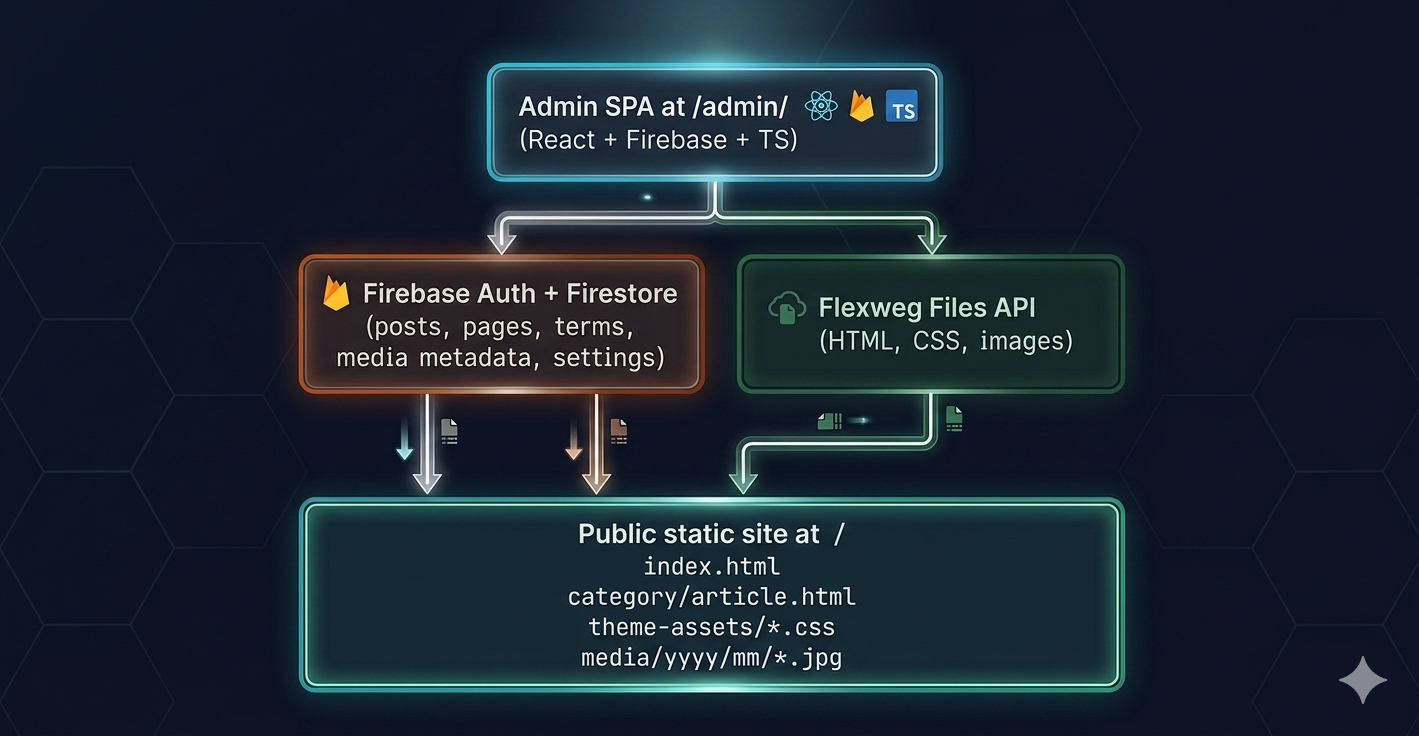
Flexweg CMS is a WordPress-style content management system that publishes a 100% static site to Flexweg hosting via the Flexweg Files API. The admin is a React + TypeScript single-page app backed by Firebase (Authentication + Firestore); on every publish, it renders pages with the active theme and uploads the resulting HTML files directly to Flexweg.
There is no Node.js, PHP, or database running on the public site — only the static HTML/CSS/JS the admin pushes there. That makes Flexweg CMS fast, cheap, and easy to host on any static-only platform.
What you can do with it
- Write posts and pages in a Gutenberg-style block editor (Tiptap-based) with markdown, embeds, custom HTML, columns and theme-specific blocks
- Organise content with categories and tags, and define menus that render dynamically on the public site
- Pick from three built-in themes —
default(versatile),magazine(editorial / long-form) andcorporate(vitrine / SaaS) — or install custom ones - Extend with plugins for sitemaps, RSS feeds, archives, search, SEO, content imports and more
- Author your own plugins and themes that ship as ZIPs and load at runtime — no rebuild of the admin needed
- Translate the admin UI between 7 languages (English, French, German, Spanish, Dutch, Portuguese, Korean) per user
- Migrate from WordPress via the built-in import plugin (markdown / WordPress XML)
Where to start
If you've never used Flexweg CMS before:
- What is Flexweg CMS — the model in 5 minutes
- How it works — what publishing actually does under the hood
- Quick start — deploy your first site in ~15 minutes
Already familiar with the static-site model? Jump to:
- Installation overview — pick the deployment path that fits you
- The admin interface — tour of what's where
- Creating your first post — content workflow
For developers
Want to extend Flexweg CMS or contribute to it?
- Creating plugins — hooks, filters, actions, dashboard cards
- Creating themes — templates, blocks, CSS pipelines
- Runtime API reference — the public
@flexweg/cms-runtimesurface - [Architecture] — how the admin fits together
Community and support
The fastest way to try Flexweg CMS is to follow the Quick start — it walks you through a complete deploy in three steps: create a Firebase project, upload dist/admin/ to your Flexweg site, and fill the in-admin setup form. No local build required.