Deploy a ready-made ticket manager (React + Firebase)
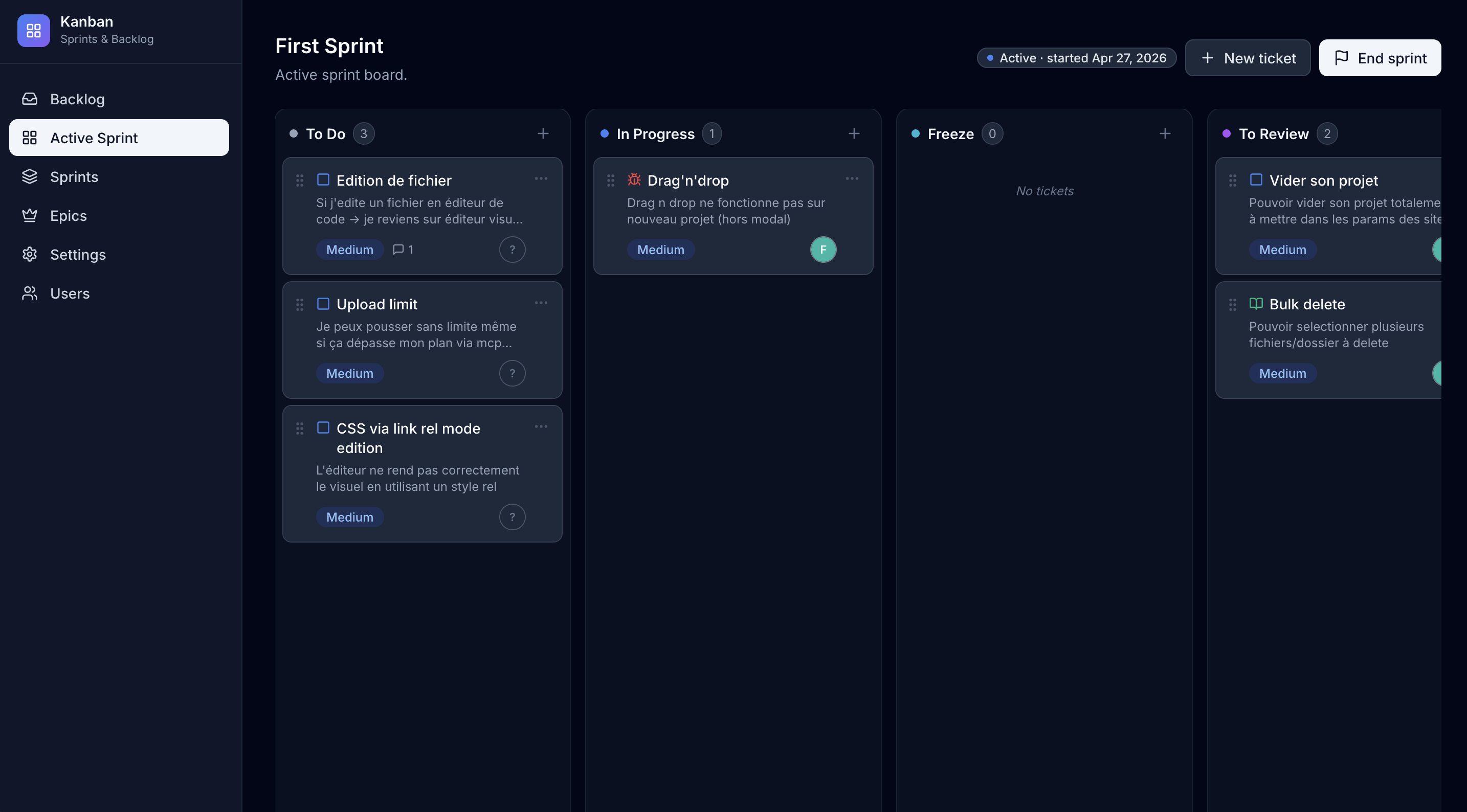
This Kanban is fully open source. The source code, build scripts and Firestore rules live on GitHub at github.com/fleweg/kanban — clone it, fork it, contribute to it, or just read the code to understand how everything fits together.
This tutorial walks you through deploying a fully functional Jira-like ticket manager — backlog, sprints, drag-and-drop Kanban board, real-time sync, user roles — on Flexweg, for free, using Firebase as the backend.
You don't write any code. The project is open source and ready to ship — you just clone it, plug in your own Firebase keys, run the build, and upload the result to Flexweg. The whole thing takes about 15 minutes.
The goal is to prove a single point: static hosting doesn't mean static content. The site is delivered by Flexweg as plain HTML/JS, but it reads from and writes to a real database (Firestore), authenticates real users (Firebase Auth), and enforces fine-grained access rules — all from the browser.
What you'll get
- A Kanban board with backlog, active sprint, configurable workflow columns, drag-and-drop tickets, comments, assignees, epics.
- Real-time updates — every browser session sees changes the moment they happen.
- Email + password authentication with two roles (admin, user).
- Firestore security rules so signed-out visitors see nothing, disabled accounts are blocked, and only admins manage users.
- A live URL on Flexweg that you can hand out to your team.
- Total cost: 0 € under the free tiers of Flexweg and Firebase.
The project is open source: github.com/fleweg/kanban.
Why this works on a static host
The page itself is React + Vite, compiled at build time into a folder of static files. Flexweg serves those files. Once the page loads in the visitor's browser, the JavaScript talks directly to Firebase over HTTPS — no Flexweg backend involved.
- Authentication: Firebase Auth is a JS SDK that handles sign-in entirely on the client.
- Database: Firestore exposes a JS SDK with security rules enforced server-side, so even if the API key is shipped in the bundle (it has to be — it's a publishable key by design), unauthorized reads/writes are rejected.
- Real-time:
onSnapshotopens a WebSocket-like connection to Firestore directly from the browser.
This is exactly the BaaS pattern — but applied to a real, complete application.
Prerequisites
- The common setup from the Prerequisites page (Docker or Node, Git, GitHub if you want to fork, a free Flexweg account).
- A Google account (any Gmail address works) to sign in to Firebase and create a project.
Step 1 — Clone the project
git clone https://github.com/fleweg/kanban.git
cd kanban
This is a stock React + Vite app. The repository has no secrets in it — every value sensitive to your project lives in the .env file you'll create in Step 4.
Step 2 — Set up your Firebase project
This kanban needs a Firebase project (Firestore database, email/password authentication, a registered web app). The setup is identical for any Firebase-backed Flexweg site, so it lives on its own page:
Open the Firebase setup guide, follow Steps 1 to 19, then come back here.
When you're done, you'll have:
- A Firebase project with Firestore in production mode
- Email/password authentication enabled
- A bootstrap admin account (its email will go into your
.env) - The 6 Firebase web app config values (api key, project ID, etc.)
Once you've completed the shared setup, leave the Firebase console open on the Firestore Database page — you need it for the next step.
Step 3 — Apply the kanban Firestore security rules
The shared setup left your Firestore database without any project-specific rules. The kanban needs the rules below to enforce auth, role-based access and comment ownership.
In the Firebase console, go to Firestore Database → Rules, paste the ruleset below, and click Publish.
Replace [email protected] with the same email you used as the bootstrap admin (Step 18 of the Firebase setup).
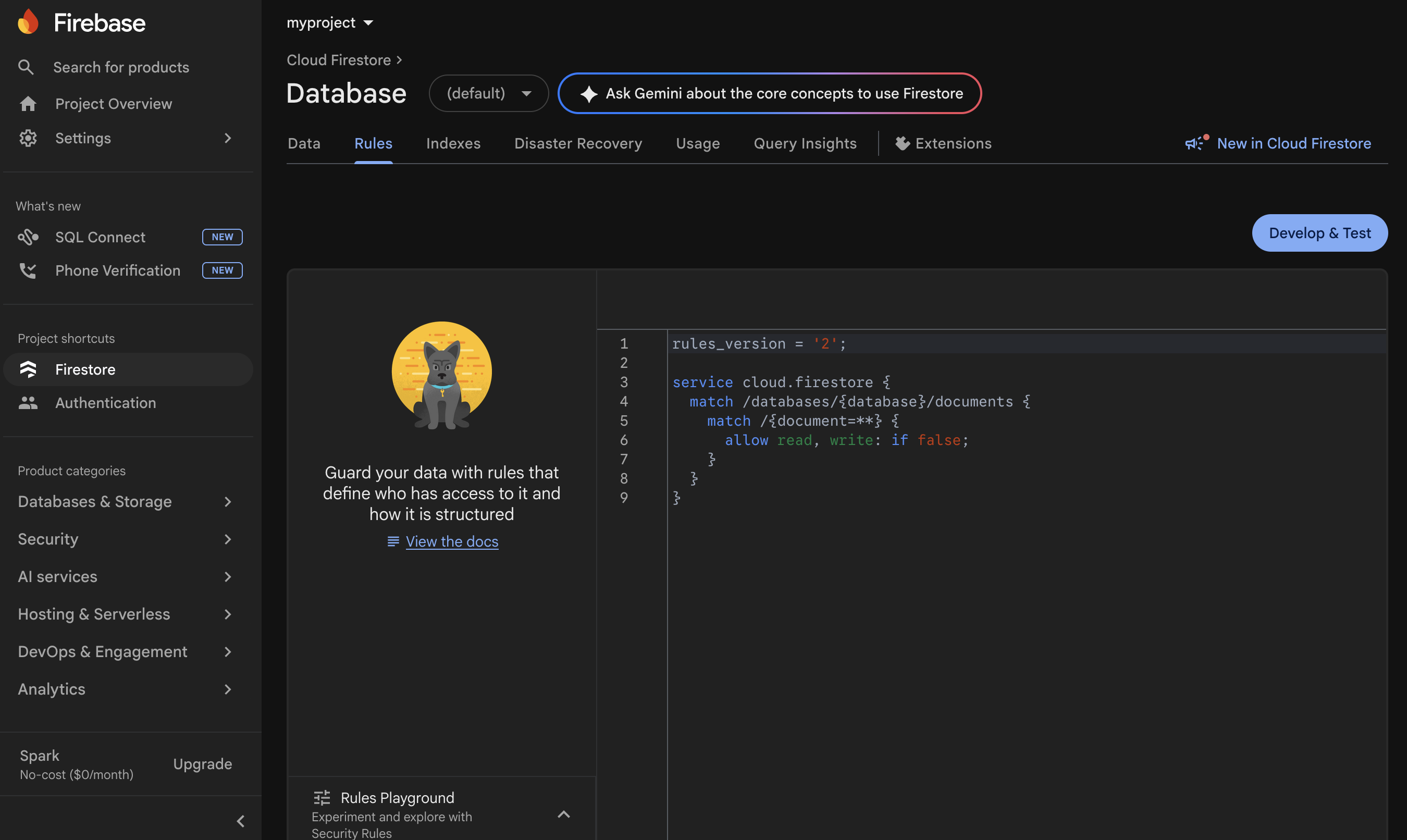
rules_version = '2';
service cloud.firestore {
match /databases/{database}/documents {
function signedIn() {
return request.auth != null;
}
function userDoc() {
return get(/databases/$(database)/documents/users/$(request.auth.uid)).data;
}
function isBootstrapAdmin() {
}
function hasUserDoc() {
return signedIn() && exists(/databases/$(database)/documents/users/$(request.auth.uid));
}
function isActiveUser() {
return isBootstrapAdmin() || (hasUserDoc() && userDoc().disabled != true);
}
function isAdmin() {
return isBootstrapAdmin() || (hasUserDoc() && userDoc().role == "admin" && userDoc().disabled != true);
}
match /tickets/{id} { allow read, write: if isActiveUser(); }
match /sprints/{id} { allow read, write: if isActiveUser(); }
// Teams catalog — readable by every active member (the team
// switcher and assignee picker render the list), writable only by
// admins (create/rename/delete on the /teams page).
match /teams/{id} {
allow read: if isActiveUser();
allow write: if isAdmin();
}
// Tags vocabulary — read by every active member; create + update
// open to any active user (inline-create in the TagPicker keeps
// friction low, like Trello labels); delete restricted to admins
// (deletion cascades a strip across every ticket's `tagIds`).
match /tags/{id} {
allow read: if isActiveUser();
allow create, update: if isActiveUser();
allow delete: if isAdmin();
}
// Workflow JSON is editable by every active member (Settings page).
match /config/workflow { allow read, write: if isActiveUser(); }
// One-shot migration flags (teams backfill). The first authenticated
// boot writes the flag so the migration only runs once per project.
match /config/migrations { allow read, write: if isActiveUser(); }
// Flexweg API key — readable by active users (the attachments service
// needs it to upload), writable only by admins.
match /config/flexweg {
allow read: if isActiveUser();
allow write: if isAdmin();
}
// Asana connector config (PAT + optional status-field mapping) —
// same posture as the Flexweg key: read by every signed-in user
// (the ticket modal needs it to call the Asana API), write by
// admins only.
match /config/asana {
allow read: if isActiveUser();
allow write: if isAdmin();
}
match /tickets/{ticketId}/comments/{commentId} {
allow read: if isActiveUser();
allow create: if isActiveUser() && request.resource.data.authorId == request.auth.uid;
// Soft-delete is performed via update (sets deleted: true), so updates
// are open to the author and to admins. Hard-delete is forbidden.
allow update: if isActiveUser() && (resource.data.authorId == request.auth.uid || isAdmin());
}
match /users/{uid} {
// Self-doc is always readable (first-login bootstrap needs to detect
// that no record exists yet). Listing is open to active users so the
// app can render assignee avatars and offer the assignee picker.
allow get: if signedIn() && (request.auth.uid == uid || isActiveUser());
allow list: if isActiveUser();
// Self-create on first login: any signed-in user can create their
// own record with role "user". teamIds must be a list — every new
// user is auto-enrolled in the default "general" team.
allow create: if signedIn()
&& request.auth.uid == uid
&& request.resource.data.role == "user"
&& request.resource.data.disabled == false
&& request.resource.data.teamIds is list;
// Admins can update or delete any user record. Users can update
// their own record as long as role / disabled / email don't
// change — this lets them set/clear their own `avatarPath` +
// `avatarUrl` via the Profile modal without granting any
// privilege-escalation surface.
allow update: if isAdmin()
|| (signedIn()
&& request.auth.uid == uid
&& request.resource.data.role == resource.data.role
&& request.resource.data.disabled == resource.data.disabled
&& request.resource.data.email == resource.data.email);
allow delete: if isAdmin();
}
}
}
What these rules say in plain English:
- Nothing is readable while signed out — visitors who aren't authenticated see nothing.
- Disabled accounts are blocked at the database level, not just hidden in the UI.
- Only admins can manage the
userscollection (promote/demote, disable, delete). - Comments can only be edited by their author or an admin — soft-delete only, no hard delete.
The kanban project's README has the same setup written as text — useful if you want to cross-check anything.
Step 4 — Configure your .env
In the cloned project, copy the example file and fill in the values from your Firebase setup (the 6 web-app config values + the admin email):
cp .env.example .env
Open .env in your editor and replace each value:
# Copy this file to .env and fill in your Firebase project credentials.
# Find these values in Firebase Console > Project settings > General > Your apps > SDK setup and configuration.
VITE_FIREBASE_API_KEY=AIzaSy...
VITE_FIREBASE_AUTH_DOMAIN=your-project.firebaseapp.com
VITE_FIREBASE_PROJECT_ID=your-project
VITE_FIREBASE_STORAGE_BUCKET=your-project.appspot.com
VITE_FIREBASE_MESSAGING_SENDER_ID=1234567890
VITE_FIREBASE_APP_ID=1:1234567890:web:abcdef
# Email of the bootstrap administrator. This account is treated as admin
# without needing a record in the `users` Firestore collection. The same
# value MUST be referenced in your Firestore security rules.
Vite inlines every VITE_* variable into the JavaScript bundle at build time. That's intentional — the Firebase SDK needs them on the client. They are designed to be public; Firebase's security rules enforce who can read or write what, not the API key. Don't put true secrets (like a Stripe sk_live_… key) into a Vite app.
Step 5 — Build the static site
Run the build to produce the dist/ folder. Pick whichever stack you have on hand.
- With Node.js (npm)
- With Docker
npm install
npm run build
npm run preview
The preview server prints something like:
> [email protected] preview
> vite preview

  ➜  Local:   http://localhost:4173/
  ➜  Network: use --host to expose
Open the URL Vite shows you (here http://localhost:4173/) — you should see the sign-in screen. Log in with the admin email/password you created in Step 18 of the Firebase setup.
# Install dependencies (one-shot)
docker run --rm -v "$(pwd):/app" -w /app node:20-alpine npm install

# Build the static site
docker run --rm -v "$(pwd):/app" -w /app node:20-alpine npm run build

# Preview the build locally
docker run --rm -p 4173:4173 -v "$(pwd):/app" -w /app node:20-alpine \
  npm run preview -- --host 0.0.0.0
Open http://localhost:4173/ — you should see the sign-in screen. Log in with the admin email/password you created in Step 18 of the Firebase setup.
The build produced a folder called dist/ at the project root. Inside, you'll find:
dist/
├── index.html
├── assets/
│   ├── index-abc123.js
│   ├── index-def456.css
│   └── ...
└── vite.svg
That's a complete, self-contained static site — exactly what Flexweg needs.
Step 6 — Upload to Flexweg
- Log into your Flexweg account and open your site.
- Upload the contents of
dist/(not the folder itself) to the root of your Flexweg site:- Open
dist/on your machine, select all files and folders inside it. - In Flexweg's file explorer, drag and drop them at the root of your site (where
index.htmlshould live).
- Open
- Wait for the upload to complete.
Once finished, your Flexweg file explorer should look like this — index.html at the root plus the assets/ folder containing the bundled JS and CSS:
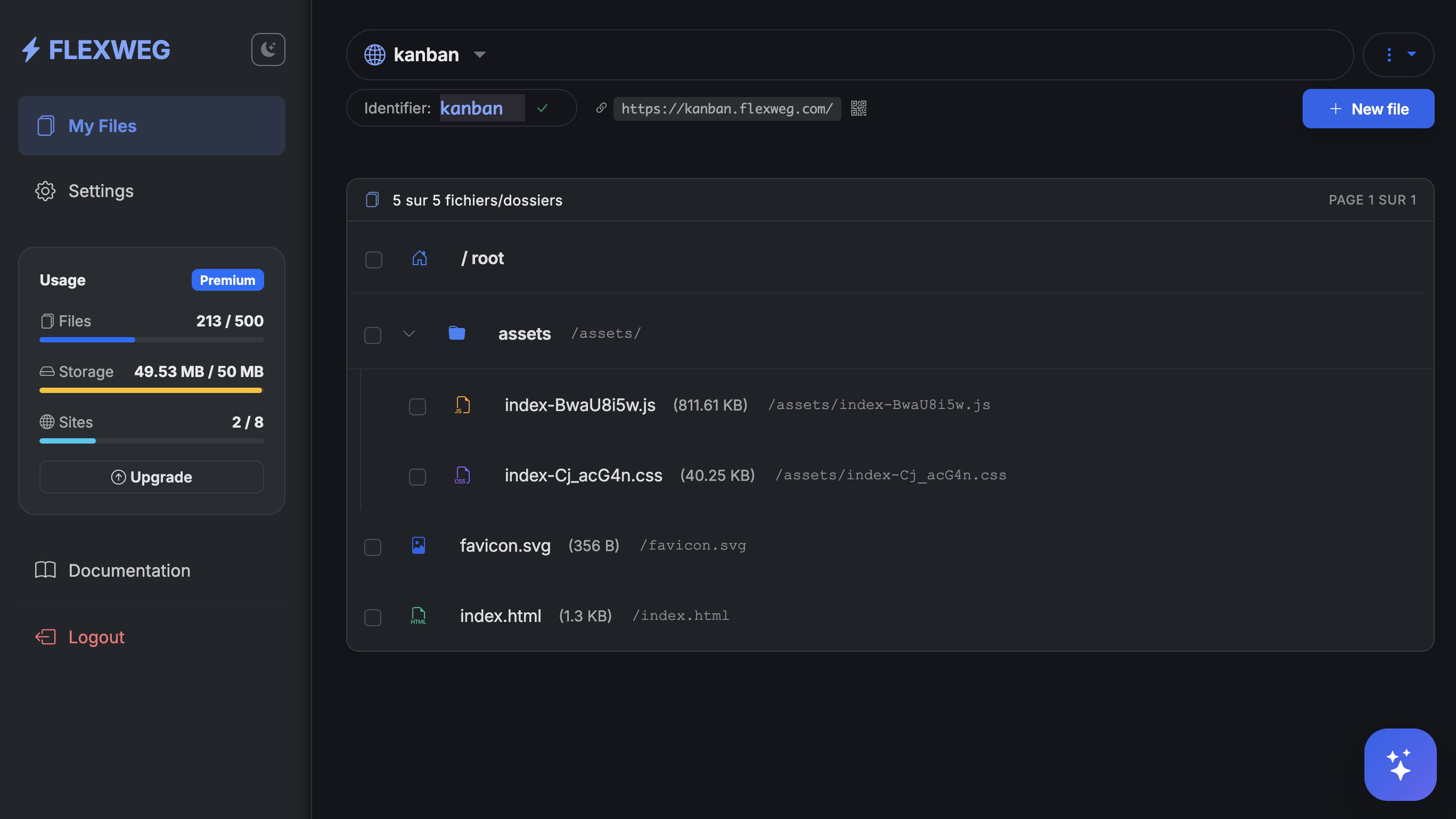
Open your Flexweg URL (e.g. https://etzdkz9x.flexweg.com/). You'll see the same sign-in screen you saw at localhost:4173. Log in with your admin email and password — the app talks to Firebase directly from the browser, with the rules you applied in Step 3 enforcing access.
What happens on first sign-in
You don't need to create any collections, tables or fields by hand. The first time the admin signs in, the app creates the necessary collections automatically as you start using it:
config/workflow— the editable Kanban columns (created when you first open the Settings page or create your first ticket).tickets— populated each time you create a ticket.tickets/{id}/comments— created when you post a comment.sprints— created when you start your first sprint.users— populated as new accounts sign in for the first time.
To see the data appear in real time, open another tab on console.firebase.google.com, pick your project, and go to Firestore Database → Data. As you click around in the kanban app, the corresponding documents and collections show up here. You can inspect, edit or delete entries directly from this view if needed.
Once the site works, set up the Deploy from Git workflow so every push to your fork rebuilds and redeploys automatically. Set BUILD_DIR=dist in the workflow.
Free-tier limits
The free tier of Firebase (Spark plan) is generous and covers most small-team use cases:
| Resource | Free tier |
|---|---|
| Firestore reads | 50,000 / day / database |
| Firestore writes | 20,000 / day / database |
| Firestore deletes | 20,000 / day / database |
| Stored data | 1 GB |
For a kanban with a few dozen users editing tickets, you'll likely never hit any of these.
If you outgrow the free tier, the pay-as-you-go Blaze plan is dramatically cheaper than running your own database, and you don't manage anything:
- ~$0.06 per 100k reads
- ~$0.18 per 100k writes
- Storage at $0.18 / GB / month
- Scales automatically without any infrastructure work on your side
A team that does 1 million ticket updates per month pays ~$2 — for a fully managed, replicated, real-time database. No SQL server to provision, patch or back up.
Going further
- Add custom workflow columns — open the Settings page in the deployed app to add or rename columns (stored in Firestore as JSON, no rebuild needed).
- Invite teammates — sign in as admin, open the Users page, create accounts. Each new user logs in once to bootstrap their
usersdocument, and you can promote them to admin from the same page. - Customize the look — fork the repo, edit the Tailwind classes in
src/, redeploy. - Plug Firebase into your own project — the same authentication + Firestore pattern works for any data-driven static app: blog comments, internal admin tools, dashboards, multiplayer apps. See Connect to external databases for other BaaS options.
Recap
You now have:
- A real, static-hosted ticket manager that looks and behaves like a SaaS app.
- An auth-gated, role-based, real-time database backed by Firebase.
- Total monthly hosting cost: €0 for personal and small-team use.
The lesson generalizes: whatever a "dynamic" web app does, a static site backed by a BaaS can do too — usually for free, always without a server to maintain.